Sarathi Parivahan Status: Check Driving Licence (DL) Status Online
How to check your Driving Licence (DL) Status, Vahan RC Details, and Traffic Challan status online? (ड्राइविंग लाइसेंस और आरसी स्टेटस कैसे चेक करें?) Get the official Ministry of Road Transport and Highways (MoRTH) guidelines in easy English and simple Hindi below, fully compliant with the Motor Vehicles Act.
Sarathi Parivahan Status Check Online (DL, RC & Challan)
Already checked status? Understand DL/RC Status Meaning (स्टेटस का मतलब जानें)
Safety & transparency
We do not collect or store data: This tool only acts as a secure search utility. When you click search, we do not save your Application Number or Licence Details. Always ensure you check the address bar reads parivahan.gov.in before entering details on official portals.
Official / Fast / Updated Data Access
What Information Do You Need Help With?
आपको किस जानकारी में मदद चाहिए?
Select your required service from the options below to access the direct, official government portals.
अपनी जरूरत के हिसाब से नीचे दिए गए विकल्पों में से आधिकारिक सरकारी पोर्टल पर जाएं।
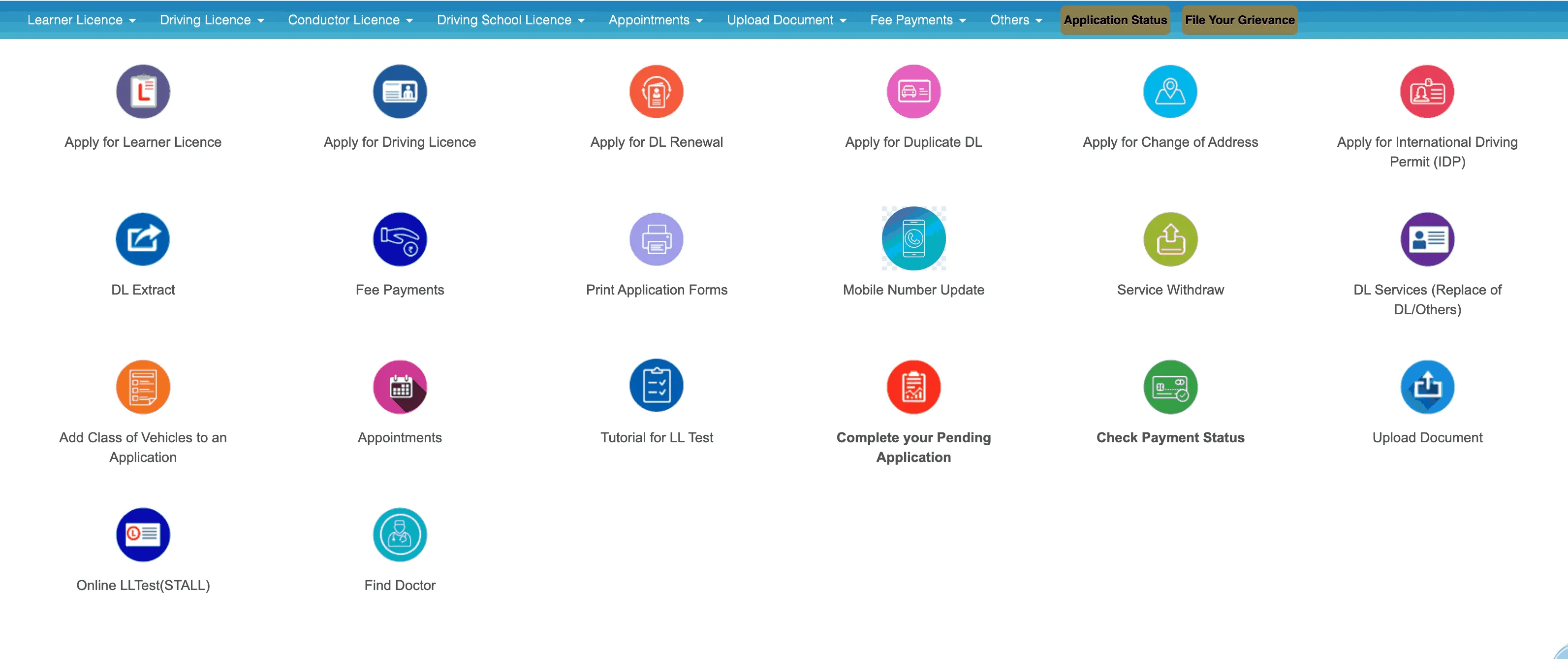
DL Application Status Check
Track the real-time status of your driving licence application or renewal across all states. Get accurate updates directly from the Sarathi 4.0 database for your learning and permanent licence.
Vahan RC Status Check
Verify registration certificate (RC) details, ownership info, vehicle fitness, and road tax online through the National Informatics Centre (NIC) Vahan 4.0 registry.
Traffic e-Challan Status
Search, check status, and pay pending traffic police violations and fines online safely across all Indian states and RTO zones.
Apply for Learner's Licence
Apply online for a fresh learner's licence (LL) via contactless Aadhaar authentication. Upload your Form 1 (Medical Certificate) and schedule your computerized mock test.
Driving Licence Renewal
Submit your application online to renew expired or expiring driving licences easily. Track the dispatch status of your new smart card.
Duplicate DL Application
Get a duplicate driving licence online in case your original is lost, stolen, or damaged. Avoid long queues at the RTO office.
How to check your Driving Licence (DL) status online?
To check your DL status online on the Parivahan Sewa portal, visit sarathi.parivahan.gov.in, click "Application Status", enter your application number and date of birth, and submit. This tracks everything from document scrutiny to smart card dispatch. You can also track it via SMS for vehicle data. सारथी पोर्टल पर ऑनलाइन और एसएमएस के माध्यम से स्टेटस चेक करने की आसान हिंदी गाइड नीचे देखें。
-
1
Open the official Sarathi portal
Go directly to the authorized website: sarathi.parivahan.gov.in
-
2
Select Application Status
Click on "Applicant Status" usually found under the main Driving Licence section.
-
3
Enter your details
Provide your Application Number or DL Number along with your Date of Birth.
-
4
Complete CAPTCHA
Enter the security code shown on screen and click Submit.
-
5
Select your State
On the portal, select your respective State (e.g., Uttar Pradesh, Maharashtra, Delhi, Bihar) from the dropdown to load your state's RTO dashboard.
-
6
Understand your status
Your current DL application status will be displayed — return to Section 7 below to understand what each status label means.
-
1
Note on DL vs RC
For DL status, only the online portal is available. SMS service is primarily for vehicle (RC) data.
-
2
Format the SMS
Type VAHAN <vehicle number> (Example: VAHAN MH12AB1234)
-
3
Send the message
Send the SMS to 7738299899 from your registered mobile number.
State-wise RTO Portals (Sarathi Ecosystem)
The official Sarathi platform supports RTO operations across all Indian States and Union Territories. Make sure you select your correct state when prompted:
What Driving Licence Services Can You Access Online?
You can apply for a learner's licence, renew an expired licence, request a duplicate DL, and check your application status directly on the Sarathi Parivahan portal. Explore all categories, eligibility requirements, and application steps below.
What are the different types of Driving Licences in India?
Under the Motor Vehicles Act, RTOs issue different categories of licences based on the type of vehicle you intend to drive:
A temporary licence valid for 6 months, issued to practice driving under supervision before obtaining a permanent licence.
Issued after passing the RTO driving test. Valid for private vehicles up to 20 years or until age 40.
Required for driving heavy commercial vehicles, passenger cabs, and trucks. Valid for 5 years (3 years for hazardous goods).
Issued to Indian citizen DL holders to drive motor vehicles in foreign countries. Valid for 1 year.
Who is eligible to apply for a Driving Licence?
Any Indian citizen aged 18 or above is eligible for a standard driving licence, while those aged 16 can apply for a gearless vehicle licence with parental consent. To be eligible for applying for a driving licence, you must satisfy the following conditions:
| Vehicle Category | Minimum Age | Other Requirements |
|---|---|---|
| Geared Vehicle (MCWG, LMV) | 18 Years | Must possess general physical and mental fitness. |
| Gearless Engine (up to 50cc) | 16 Years | Requires formal consent from a parent or legal guardian. |
| Commercial / Transport Vehicles | 20 Years | Must have completed 8th-grade education and hold a valid LMV licence for 1 year. |
What documents are required for a Driving Licence?
You will need valid age proof (like a Birth Certificate or 10th mark sheet), address proof (like an Aadhaar or Passport), and recent passport-size photographs. Here is the complete list of accepted documents:
- Proof of Age (any one): Aadhaar Card, Birth Certificate, School Leaving Certificate, Passport, PAN Card.
- Proof of Address (any one): Passport, Voter ID Card, Aadhaar Card, LIC Policy, Electricity or Gas bill.
- Application Forms: Form 1 (Self-declaration) and Form 1A (Medical certificate for commercial/aged over 40).
- Photographs: 3 recent passport-sized photographs.
- Existing Licence: Learner's Licence (for new DL) or original DL (for renewals or duplicate services).
Driving Licence Apply
Apply online for a new licence securely via the official contactless faceless system.
Steps to Apply for a Driving Licence
-
1
Select Licence Category
Visit the official portal sarathi.parivahan.gov.in, select your state, and choose "Apply for Learner Licence" first.
-
2
Fill Applicant Details
Enter your personal information, address, educational qualifications, and select the classes of vehicles you wish to drive.
-
3
Upload Required Documents
Upload clear digital copies of your Age Proof, Address Proof, and Form 1 (Self-Declaration).
-
4
Fee Payment
Submit your application fees online using Net Banking, Debit/Credit cards, or UPI.
-
5
Book Slot & Attend LL Test
Schedule your computer-based test slot (contactless states allow online LL exams from home) and pass the test to get your Learner's Licence.
-
6
Apply for Permanent Licence
After a mandatory 30-day practice period (and within 6 months of LL issuance), select "Apply for Driving Licence", book your test slot, and pass the RTO driving track test.
Driving Licence Related Services
The Sarathi platform provides multiple ancillary services to maintain your driving credentials smoothly:
Following are the stages of application for applying learners licence
- Filling of Application Details: Entering full personal credentials online.
- Uploading of Documents: Submission of age, address, and physical fitness certificates.
- Uploading of Photo and Signature: Uploading biometric files (for non-faceless states).
- Fee Payment: Completing the payment online.
- Slot Booking: Scheduling the computer-based RTO slot (if applicable).
Attend the Driving Test
To obtain a Permanent DL, you must Attend the Driving Test in person at the scheduled RTO track. You must bring your own vehicle (of the same category applied for) and showcase proper driving proficiency, reversing, and sign awareness. An RTO officer will evaluate your skills on the track.
Driving Licence Status
After submitting your application or appearing for the driving test, you can check your Driving Licence Status in real-time. Please refer to our step-by-step DL Status Check Guide above to check your status online or via SMS.
Driving Licence Download
Once your licence is issued, you can download a digital version which is completely valid under the Motor Vehicles Act:
For Learner’s Licence:
You can print your Learner's Licence directly from the Sarathi portal without visiting the RTO:
- Go to sarathi.parivahan.gov.in and select your state.
- Go to the "Licence" menu and select "Print Learner's Licence (Form 3)".
- Enter your Application Number and Date of Birth, or Mobile Number.
- Enter the OTP sent to your registered number and click "Submit" to view and download your Learner's Licence PDF.
How to Check RC / Vehicle Registration Details
Verify registration validity, insurance, and fitness data securely.
-
1
Visit Vahan Service Portal
Go to vahan.parivahan.gov.in/vahanservice/
-
2
Select Service
Click on "Know Your Vehicle Details" from the menu options.
-
3
Enter Registration
Type your full vehicle registration number (e.g., MH12AB1234) without spaces.
-
4
Verify CAPTCHA
Enter the shown verification characters accurately.
-
5
View Details
Vehicle owner name (masked for privacy), RC status, insurance, PUC, and fitness details are shown.
-
6
DigiLocker & mParivahan
You can download the digital copy of your RC on the DigiLocker or mParivahan app. It is legally valid across India under the IT Act 2000 and Motor Vehicles Rules. You can also perform a Nol Card Balance check online or visit 3 patti lucky for more info.
What Does Your DL Application Status Mean?
Match the exact wording shown on the portal, then follow the correct next step.
What it means: The RTO has received your application but has not finalized the review. It is in the queue for processing.
What to do next: Wait for 3-7 working days. If it remains stuck beyond 15 days, visit your local RTO with your application printout and original documents.
Learn MoreWhat it means: Your document verification is complete, and you have scheduled a date for your driving test.
What to do next: Appear at the RTO or designated track on the booked date and time with your vehicle and Learner's Licence.
Learn MoreWhat it means: You have passed the computer-based test, and your Learner's Licence is active (valid for 6 months).
What to do next: You can apply for the permanent DL test after 30 days of LL issuance. Practice driving with an 'L' board and a licenced passenger.
Learn MoreWhat it means: You passed the test! The physical card has been printed and handed over to India Post.
What to do next: Note the Speed Post tracking number shown on the portal and track it via the India Post website. You can also download a digital copy via DigiLocker.
Learn MoreWhat it means: There is an issue with your uploaded documents, photo, signature, or fee payment.
What to do next: Read the exact deficiency reason listed online. Re-upload the correct document or visit the RTO counter physically to clear the objection.
Learn MoreWhat it means: The validity period of your driving licence has elapsed. Driving is currently illegal.
What to do next: Apply for DL Renewal online immediately. If expired for more than a year, you may need to retake the driving test.
Learn MoreDriving Licence Renewal
ड्राइविंग लाइसेंस रिन्यू कराने की पूरी प्रक्रिया हिंदी और अंग्रेजी में
Must Remember:
- Grace Period (ग्रेस पीरियड): You must renew your licence within 30 days of expiry to avoid paying a late penalty fee.
- Expiry beyond 1 year: If the licence has expired for more than a year, you must undergo the RTO driving competency test again to reactivate it.
- Medical Certificate (Form 1A): Mandatory for all applicants aged 40 years or older, and for all transport/commercial licence holders.
Steps to Renew Your Driving Licence Online:
Apply online securely through the contactless Faceless service on the Parivahan Sarathi portal:
-
1
Visit the Official Portal
Go to the official portal: sarathi.parivahan.gov.in.
-
2
Select Your State
Choose your state from the dropdown list to go to your state's transport service dashboard.
-
3
Choose "Apply for DL Renewal"
Click on the "Apply for DL Renewal" option, read instructions, and click "Continue".
-
4
Enter Licence Details
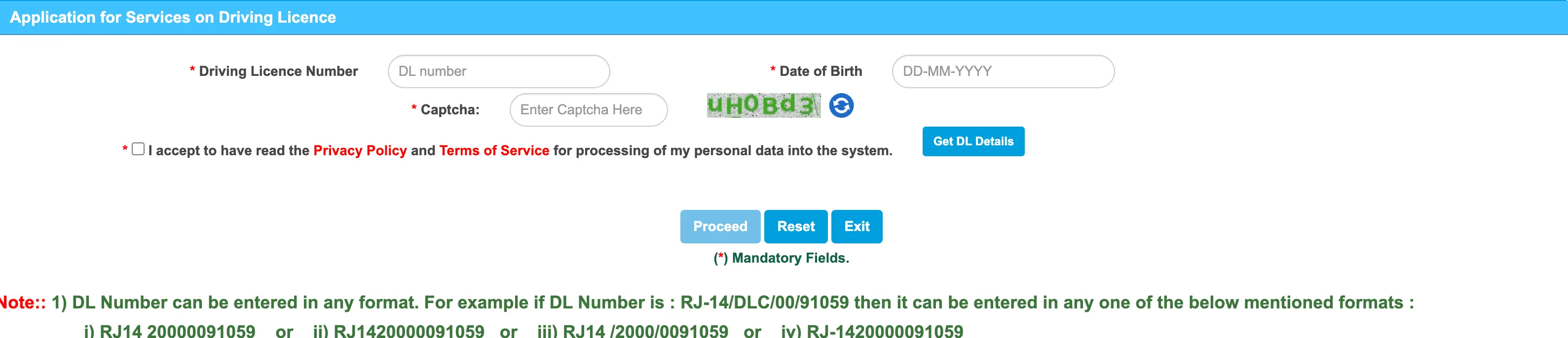
Provide your Driving Licence Number and Date of Birth. Click on "Get DL Details".
-
5
Upload Documents & Pay Fee
Fill in application details, upload required documents (Form 1A if over 40), make online fee payment, and print the receipt.
Steps to Renew Your Driving Licence Offline:
If you prefer visiting your local RTO to renew your licence manually, follow these steps:
-
1
Collect Application Forms
Obtain Form 9 and Form 1A (Medical Certificate if over 40) from the RTO counter, or download them from our Forms section below.
-
2
Get Medical Certification
For applicants over 40 or commercial drivers, have a registered medical practitioner (MBBS) sign and stamp your Form 1A.
-
3
Submit Documents at RTO
Visit your local RTO with all completed forms, original expired DL, copies of Aadhaar/Voter ID, and physical passport photos.
-
4
Pay Renewal Fees
Pay the renewal fees in cash or card at the RTO cash counter and obtain the payment receipt.
-
5
Receive Renewed DL
Your application is processed, and the renewed driving licence smart card will be dispatched to your registered address via Speed Post.
Required Documents:
- Current Expired DL (मूल ड्राइविंग लाइसेंस)
- Completed Application Form 9
- Form 1A Medical Certificate (if >40 years)
- Proof of Address & Age (Aadhaar, Voter ID)
- Passport size photographs (3 copies)
Estimated Renewal Fees
| Standard DL Renewal | ₹200 |
| Renewal (After Grace Period) | ₹300 + ₹1000/yr fine |
| Smart Card DL Charge | ₹200 |
| Note: RTO fees may vary slightly by state. | |
We guide, but the official portal acts. Open the official Parivahan portal to begin your renewal:
Open Official Sarathi Portal to Renew DLDuplicate Driving Licence
Apply for a duplicate driving licence in case of loss, theft, damage, or mutilation of your original licence card.
Requirements:
To qualify for the grant of a duplicate licence (or when verifying official land records/address documents such as via meebhoomi ap), you must satisfy the following conditions:
- The original driving licence must be lost, stolen, destroyed, or completely mutilated/torn.
- In case of a lost or stolen licence, a First Information Report (FIR) or a lost document report registered with the local police is mandatory.
- The application must be filed with the same RTO that issued your original licence, or through address change services.
Application Process for a Duplicate Driving Licence (Online):
File an online application contactless through the Sarathi portal:
-
1
Open Sarathi Portal
Visit sarathi.parivahan.gov.in and select your state.
-
2
Select Duplicate DL Service
Click on "Services on DL (Renewal/Duplicate/AED/Others)" and click "Continue".
-
3
Enter DL Credentials
Enter your original DL Number and Date of Birth, then click "Get DL Details".
-
4
Choose "Issue of Duplicate DL"
Select the checkbox for "Issue of Duplicate DL" and specify the reason (e.g., Lost, Mutilated, Destroyed).
-
5
Upload Documents & Pay Fee
Upload the police FIR (if lost), damaged DL (if mutilated), fill up Form 2, pay RTO fees online, and print the receipt.
Offline Process:
If RTO online faceless services are not supported in your state, follow the manual offline process:
-
1
File a Police Complaint
Visit your local police station and file an FIR or obtain a formal Lost Document Report listing your DL details.
-
2
Collect Form 2
Obtain a physical copy of Form 2 (L.D.D.) from your local RTO counter, or download it from our Forms section.
-
3
Submit Offline Application
Submit your completed Form 2, Police Report, damaged licence (if physical card was mutilated), Address Proof, and Age Proof at the RTO counter.
-
4
Pay RTO Duplicate Fees
Pay the duplicate licence fees at the RTO cash counter and get the payment receipt.
-
5
Card Dispatched
The RTO verifies your credentials and dispatches the duplicate licence smart card via Speed Post to your registered address.
Required Documents:
- Police FIR/Lost Report (mandatory for lost DL)
- Mutilated/Damaged original card (if applicable)
- Photocopy of original DL (if available)
- Address Proof & ID Proof (Aadhaar, Voter Card)
- Form 2 application form
Estimated Fees
| Issue of Duplicate DL | ₹200 |
| Smart Card Service Charge | ₹200 |
| Note: RTO service charges vary slightly by state. | |
Fees
Consolidated schedule of official RTO fees for driving licence and vehicle-related services as prescribed under CMVR.
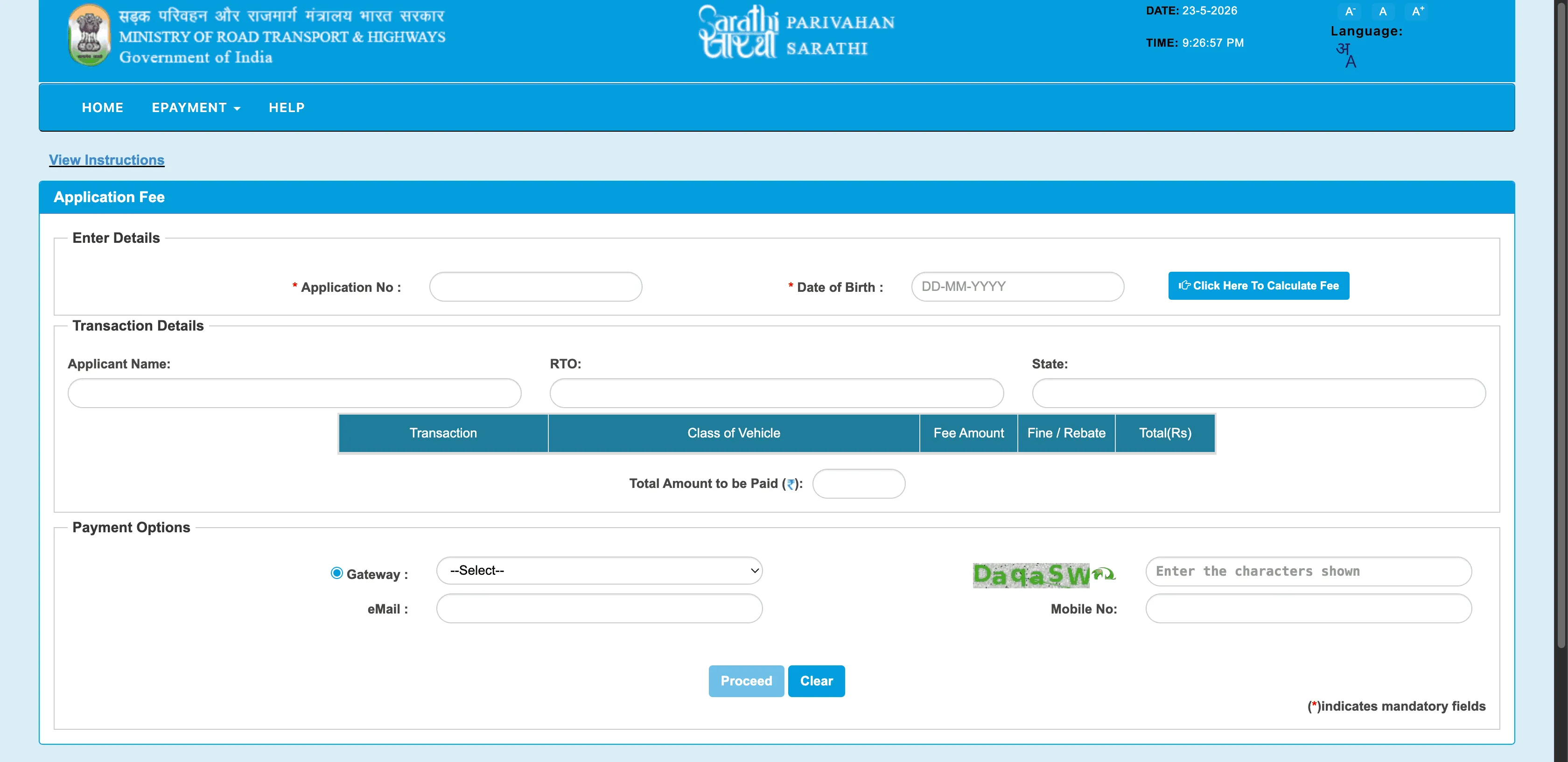
RTO fees are standardized nationally by the Ministry of Road Transport and Highways (MoRTH) under Central Motor Vehicles Rules, though individual states may collect minor additional administrative/smart-card service charges. Below is the standard fee schedule:
| Service Category | RTO Service / Purpose | Official RTO Fee |
|---|---|---|
| Driving Licence Services | Issue of Learner's Licence (per vehicle category) | ₹150 |
| Learner's Licence Test Fee (or online slot fee) | ₹50 | |
| Issue of Permanent Driving Licence (DL) | ₹200 | |
| Driving Licence Competency Test Fee | ₹300 | |
| Renewal of Driving Licence | ₹200 | |
| Issue of Duplicate Driving Licence | ₹200 | |
| Vehicle-Related Services | New Registration Certificate (RC) for Motor Cycle | ₹300 |
| New Registration Certificate (RC) for Light Motor Vehicle (LMV) | ₹600 | |
| Transfer of Vehicle Ownership (RC Transfer) | Half of the registration fee | |
| Issue of Duplicate Registration Certificate (RC) | Half of the registration fee |
What Vehicle-Related Services are available on Vahan Parivahan?
The Vahan Parivahan portal allows you to check your RC status, transfer vehicle ownership, request a duplicate RC, and pay road tax online. Here is a breakdown of the major Vahan services available across India.
1. Registration Certificate (RC) Status
Verify your vehicle registration status, owner details, chassis number, engine number, tax validity, fitness expiry, and registration date online on the official Vahan portal.
Read RC status guide2. Transfer of Vehicle Ownership
Apply online to transfer motor vehicle ownership upon selling/buying a vehicle. Requires submission of Form 29 and Form 30 to the RTO to officially record the new owner.
Get Form 29 & 30 PDF3. Duplicate RC, Hypothecation & NOC
Apply to remove bank hypothecation once your loan is closed, request a duplicate RC card if lost, or apply for a No Objection Certificate (NOC) to transfer a vehicle to another state.
Apply on official Vahan portalHow do you check and pay an eChallan online?
To check and pay your eChallan, visit echallan.parivahan.gov.in, enter your challan number, vehicle number, or DL number, verify the details, and proceed to the payment gateway. Traffic police across India have integrated their systems with the Vahan database to issue digital fines (e-Challans) instantly.
-
1
Visit the eChallan portal
Go to echallan.parivahan.gov.in
-
2
Enter Lookup Details
Enter your vehicle number, DL number, OR the specific challan number if you have it.
-
3
View Pending Fines
View a list of all pending challans along with the amount, violation type, and date/photo evidence.
-
4
Take Action
Pay online securely through the portal or plan to dispute the fine in a virtual traffic court.
Guide: How to Dispute a Challan
Official Parivahan Portals
Always use these links. Confirm the URL before entering data.
mParivahan App Download
Explore features, view structural branches, and download the official NextGen mParivahan App securely (or explore verified mobile APK guides via apkmarkhor).
NextGen mParivahan App
Official Mobile Application of Ministry of Road Transport & Highways (MoRTH)
Create a valid digital copy of your DL instantly, complete with a secure QR code for roadside verification.
Keep a digital copy of your vehicle RC active. Legally valid across all Indian states under CMVR.
Check any traffic violations or pending challans registered to your DL or vehicle and pay online directly.
Pay road tax, request temporary permits, or verify commercial vehicle fitness parameters on the go.
Find the address, contact details, and precise geographical location of any RTO across India.
Practice learner's licence computer-based question banks and mock tests to prepare for RTO exams.
Forms
Download essential application forms for driving licence and vehicle registration from the official portal.
Driving Licence
Physical Fitness Self-Declaration
Self-declaration form to confirm physical fitness. Mandatory for all Learner's and Driving Licence applications.
Medical Certificate
Mandatory medical certificate to be signed by a registered practitioner. Required for transport DL or applicants over 40.
Learner's Licence Application
The standard application form used to register and apply for a new Learner's Licence (LL) across any class of vehicle.
Permanent Driving Licence
Form to apply for a permanent driving licence test after completing the mandatory 30-day learner period.
Licence Renewal Application
Essential form to apply for renewal of an expired driving licence. Must be submitted within the grace period.
Vehicle
Application for Vehicle Registration
Mandatory form to apply for the registration of a new motor vehicle with your local RTO.
Notice of Transfer of Vehicle Ownership
Mandatory form submitted in duplicate by the seller to notify the RTO regarding the sale/transfer of the vehicle.
Report of Transfer of Vehicle Ownership
Report and application form submitted by the buyer to request transfer of vehicle registration in their name.
Common Issues & Step-by-Step Solutions
Troubleshoot the most frequent problems users face on the official Sarathi and Vahan portals.
Issue 1: Payment Debited but Status is "Pending"
Issue 2: Aadhaar OTP Not Received on Registered Mobile
Issue 3: DL Smart Card Dispatched but Not Delivered
Issue 4: RTO Slot Booking Mismatches or Cancellations
Official State-Wise RTO Support Directory
Get in touch with your specific state transport department for resolving pending applications or local portal queries.
| State / Union Territory | Official Transport Website | Helpline Contact | Support Email ID |
|---|---|---|---|
| All India (National Support) | parivahan.gov.in | +91-120-4925505 (6 AM - 10 PM) | [email protected] |
| Delhi | transport.delhi.gov.in | +91-11-23996268 | [email protected] |
| Maharashtra | transport.maharashtra.gov.in | 1800-120-8040 (Toll Free) | [email protected] |
| Uttar Pradesh | upmotortrans.gov.in | 1800-1800-151 | [email protected] |
| Karnataka | transport.karnataka.gov.in | +91-80-22353759 | [email protected] |
| Tamil Nadu | tnsta.gov.in | +91-44-28520301 | [email protected] |
| Gujarat | commissionerateoftransport.gujarat.gov.in | +91-79-23251367 | [email protected] |
| West Bengal | transport.wb.gov.in | 1800-345-5192 | [email protected] |
| Telangana | transport.telangana.gov.in | +91-40-23370081 | [email protected] |
| Andhra Pradesh | aptransport.org | +91-866-2574455 | [email protected] |
Frequently Asked Questions
No. This is an independent informational utility built to guide users. It is not affiliated with MoRTH, NIC, or the Government of India. Always use parivahan.gov.in for official services.
No. This site does not have any forms, databases, or login pages. We do not collect, process, or store any of your personal information.
Delays can happen due to document backlogs at the local RTO. If it has been more than 15-20 days, it is recommended to visit your RTO in person with your printed application receipt and original documents.
Sometimes payment gateways delay sending success responses. Wait 24 hours and check "Verify Payment Status" on the portal. If successful, you can proceed to book the slot. If failed, the amount usually refunds to your bank in 5-7 days.
A vehicle is blacklisted for serious reasons: pending severe challans, tax defaults, court cases, or if used in a crime. You must visit the RTO or Traffic Police Headquarters to clear the dues and lift the blacklist.
Yes, basic details (like make/model, validity, insurance) are public via the Vahan portal. However, sensitive details like full owner name and address are masked for privacy.
LL (Learner's Licence) is a temporary permit valid for 6 months allowing you to learn driving with a qualified passenger. DL (Driving Licence) is the permanent permit issued after passing the practical driving test.
Once "Approved" and "Printed", it is usually handed to India Post within 3-7 days. You will receive an SMS with a Speed Post tracking number to track the physical card delivery.
About sarathiparivahanin.com
This site is an independent, educational utility maintained by a team of contributors experienced with RTO processes. We aim to demystify complex government portal statuses and provide clear guidance. We do not process applications or accept fees. All official steps must be completed exclusively on the official Parivahan portals.